Back to Projects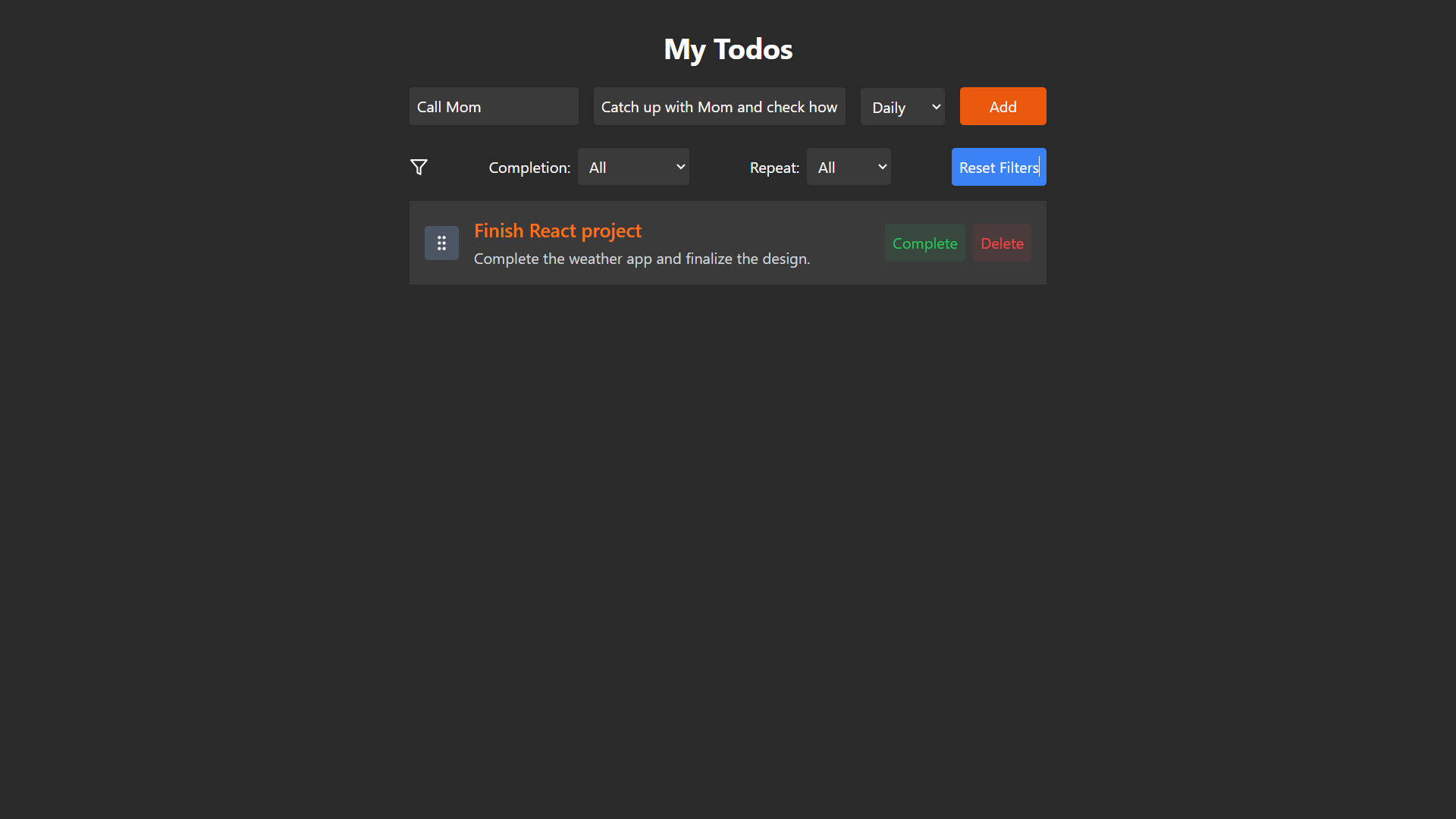
To-Dos App
Task manager with recurrence system, filtering, drag & drop, local storage and clean responsive design.
Technologies
ReactTailwindHooks
This project is a functional and interactive Todo application built using React, with features such as task creation, filtering, drag-and-drop functionality, and local storage integration. It allows users to create, mark as completed, filter tasks by completion status and repeat frequency (daily/weekly), and drag-and-drop tasks to reorder them.
The application features task repeat functionality based on daily or weekly intervals. Users can filter tasks by their completion status or their repeat frequency. A user-friendly interface is designed to handle tasks on both desktop and mobile devices, providing an interactive and smooth experience.
The application features task repeat functionality based on daily or weekly intervals. Users can filter tasks by their completion status or their repeat frequency. A user-friendly interface is designed to handle tasks on both desktop and mobile devices, providing an interactive and smooth experience.
Features Overview
1. React Components Structure:
- The project is built using React, where different components handle specific parts of the Todo app.
- Components include TodoList, TodoItem, TaskInput, and Filters, each managing their own state and logic.
- useState and useEffect hooks are used for state management, ensuring smooth updates and rendering.
2. Tailwind CSS Styling:
- Tailwind CSS is used for styling, providing a clean and modern design using utility-first classes.
- The design is responsive, adjusting seamlessly across mobile and desktop views.
- Hover effects and transitions are applied to interactive elements for better user experience.
3. Task Management Functionality:
- Users can add tasks, edit tasks, and mark them as completed or delete tasks.
- Tasks have properties like title, description, and repeat frequency (daily/weekly).
- When tasks are marked complete, they get a visual indicator and can be toggled back to incomplete.
4. Task Filtering and Sorting:
- Tasks can be filtered based on completion status: All, Completed, or Incomplete.
- Users can filter tasks by their repeat frequency (Daily, Weekly, or All).
- Sorting tasks helps users find and prioritize their tasks based on their status or frequency.
5. Drag-and-Drop Task Reordering:
- The app allows drag-and-drop functionality to reorder tasks, enabling easy organization.
- Users can simply drag tasks to different positions on the list for dynamic adjustments.
- Visual feedback during dragging ensures a smooth and intuitive reordering experience.
6. Local Storage Integration:
- Task data is stored in local storage, ensuring tasks persist across browser sessions.
- Changes (add, edit, delete) are automatically saved to local storage, and data is loaded on app initialization.
- This feature makes sure users don’t lose their tasks even if they close the browser or refresh the page.
7. Responsive User Interface:
- The app’s layout is fully responsive and adapts to various screen sizes using Tailwind’s grid system.
- The design maintains usability and readability on both mobile and desktop devices.
- Interactive elements like buttons and filters adjust in size and positioning based on screen width.
What I Learned
1. React State Management:
- Learned how to use React's useState hook to manage dynamic states and update the UI efficiently.
- Handled multiple complex states in a single component to create an interactive, dynamic experience.
2. JavaScript Functionality:
- Implemented task-related logic such as adding, deleting, toggling completion, and resetting repeat tasks.
- Developed a drag-and-drop feature using React's event system and managing dynamic styles to provide visual feedback during dragging.
3. Handling Local Storage:
- Gained experience in integrating local storage with React, allowing data persistence between sessions.
- Implemented helper functions for reading and writing data to local storage.
4. UI/UX Design:
- Designed a user-friendly interface with clear labeling and visual cues (e.g., hover effects, disabled buttons) to enhance the overall user experience.
- Ensured responsiveness for both desktop and mobile views.
5. Filtering and Search:
- Implemented multiple filters to refine task views based on completion status and repeat frequency.
- Applied filtering logic dynamically based on user input, improving the usability of the app.
6. Event Handling and Dynamic Updates:
- Used React's event system to handle user interactions such as task completion, deletion, and dragging, ensuring seamless updates to the task list.
7. Project Organization:
- Organized React components and helper functions to ensure a maintainable and clean project structure.
- Separated concerns (task logic, filter logic, local storage) into distinct, easy-to-manage units of code.