Back to Projects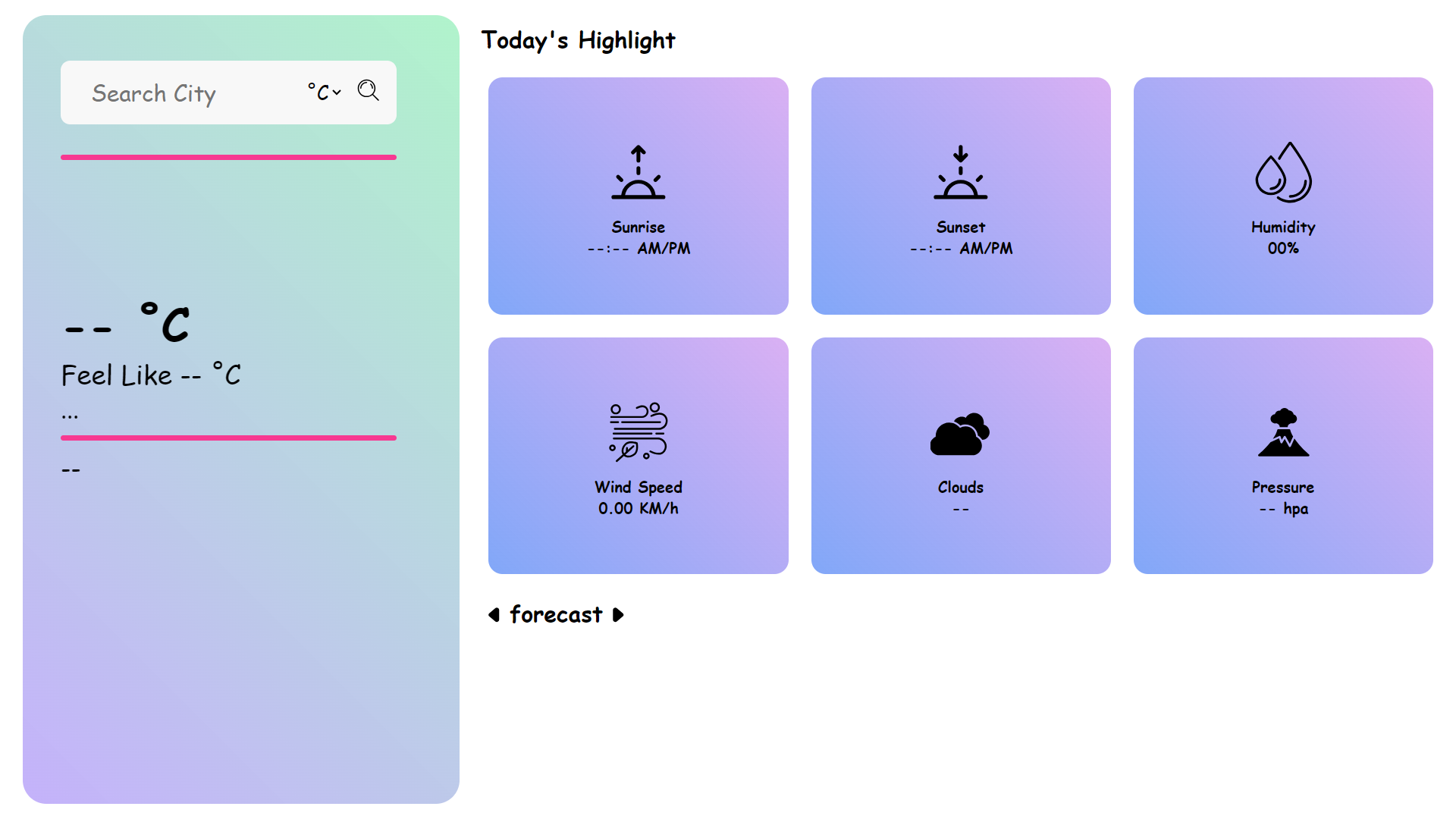
Weather App
Live weather updates using OpenWeatherMap API with responsive UI and dynamic state management.
Technologies
ReactAPICSS
This weather web application allows users to search for weather details by simply entering a city name. Once a city is searched, the app provides comprehensive information such as the city and country, current temperature, feels-like temperature, and a brief weather description with an icon, along with the current date and time. Users can also access important weather metrics such as sunrise and sunset times, humidity, wind speed, cloud cover, and atmospheric pressure. Additionally, there’s an option to view temperatures in either Celsius or Fahrenheit, allowing for a personalized weather experience.
The standout feature of this app is the 5-day weather forecast. It provides the maximum and minimum temperatures for each day, along with weather descriptions and corresponding images. The forecast is updated every 3 hours, giving users a detailed look at how the weather will change throughout the next five days.
The standout feature of this app is the 5-day weather forecast. It provides the maximum and minimum temperatures for each day, along with weather descriptions and corresponding images. The forecast is updated every 3 hours, giving users a detailed look at how the weather will change throughout the next five days.
Features Overview
1. React Components Structure:
- Component-Based Architecture: The project is built using React with just two main components: Card and ForecastCard.
- Card Component: Displays the current weather information, including city name, temperature, description, humidity, wind speed, etc.
- ForecastCard Component: Shows the 5-day weather forecast, displaying the maximum and minimum temperatures and weather descriptions for each day.
2. Weather Data Fetching:
- API Integration: The app fetches weather data from the OpenWeather API, which includes current weather details and a 5-day forecast based on the city entered.
- Dynamic Updates: The weather details are updated dynamically each time a user searches for a new city, ensuring the data is always current.
User Interface and Styling:
- Plain CSS Styling: The app uses plain CSS for styling, with an external .css file to ensure a clean, modern design. This includes custom styling for the Card and ForecastCard components.
- Responsive Design: The app layout is responsive, ensuring the app looks great on mobile and desktop devices, adapting smoothly to different screen sizes.
3. Weather Metrics Display:
- Current Weather Info: The Card component displays the current weather, including temperature, feels-like temperature, and key metrics like wind speed, humidity, and pressure.
- 5-Day Forecast: The ForecastCard component provides a detailed forecast for the next five days, showing maximum and minimum temperatures along with weather descriptions and icons.
4. Temperature Unit Toggle:
- Celsius/Fahrenheit Switch: The app allows users to toggle between Celsius and Fahrenheit temperature units, providing a customized experience based on user preferences.
What I Learned
1. React State Management:
- Dynamic Data Handling: Used useState and useEffect hooks for managing the weather data dynamically. Each time a user searches for a city, the components (both Card and ForecastCard) update automatically based on new data from the OpenWeather API.
- Component Reusability: By structuring the project with reusable components, I was able to keep the code clean and efficient. Both Card and ForecastCard components share similar logic for displaying weather data, making them easily reusable for different sections of the app, such as displaying the current weather or forecast.
2. Component Reusability:
- Modular Design: Both components follow a modular approach, allowing for the reuse of similar structures and logic. For example, the ForecastCard component can be reused across different sections if the design were to change, and Card can be updated or reused for other weather-related functionalities.
- Efficient Updates: Since both components share similar code patterns, any changes made to one component (e.g., styling or data parsing) can be applied easily to the other, ensuring a more maintainable codebase.
3. API Integration:
- Fetching Weather Data: Integrated OpenWeather API to fetch current weather and forecast data. This helped in learning how to handle asynchronous operations with async/await to ensure smooth fetching and display of data.
- Handling Dynamic Responses: Used JavaScript functions to format and parse the response from the API, handling different weather conditions and ensuring consistent display of data in both components.
4. UI/UX Design:
- Plain CSS Styling: Styled the app using plain CSS linked through an external stylesheet, ensuring consistency and a smooth user experience across components.
- Responsive Layout: Designed the layout to be fully responsive, with adaptive features for both mobile and desktop views, ensuring that weather data is displayed clearly on all devices.
5. Event Handling and Dynamic Updates:
- Search Functionality: Implemented the search feature to allow users to search by city and view updated weather data in real-time.
- Real-Time Data Updates: Ensured that when the user changes the city, the Card and ForecastCard components automatically update with the new weather data, providing a smooth user experience.
6. Weather Data Parsing:
- Data Formatting: Parsed API responses to extract relevant weather details (e.g., temperature, wind speed, etc.), and formatted them for display in both the Card and ForecastCard components.
- Date and Time Management: Handled date and time formatting to display the correct time and date in the weather and forecast sections, ensuring users get accurate, localized information.